(1) eclipse 다운로드 https://www.eclipse.org/downloads/packages/
Eclipse Packages | The Eclipse Foundation - home to a global community, the Eclipse IDE, Jakarta EE and over 350 open source pro
530 MB 41,500 DOWNLOADS Tools for developers working with Java and Web applications, including a Java IDE, tools for JavaScript, TypeScript, JavaServer Pages and Faces, Yaml, Markdown, Web Services, JPA and Data Tools, Maven and Gradle, Git, and more. Clic
www.eclipse.org
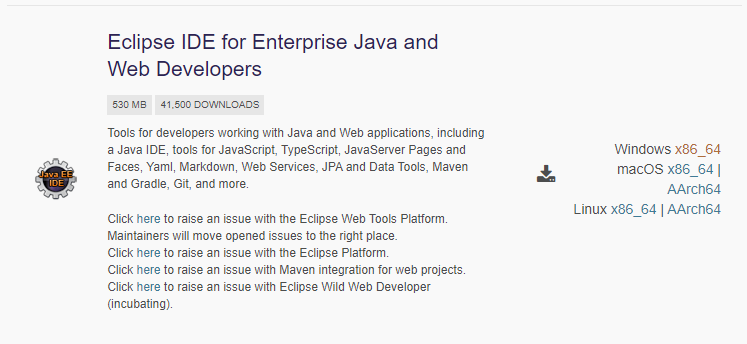
위 사이트에 접속하여 해당 프로그램을 다운받는다
(2) java 컴파일러 다운로드 https://www.oracle.com/kr/java/technologies/downloads/#java21
Download the Latest Java LTS Free
Subscribe to Java SE and get the most comprehensive Java support available, with 24/7 global access to the experts.
www.oracle.com
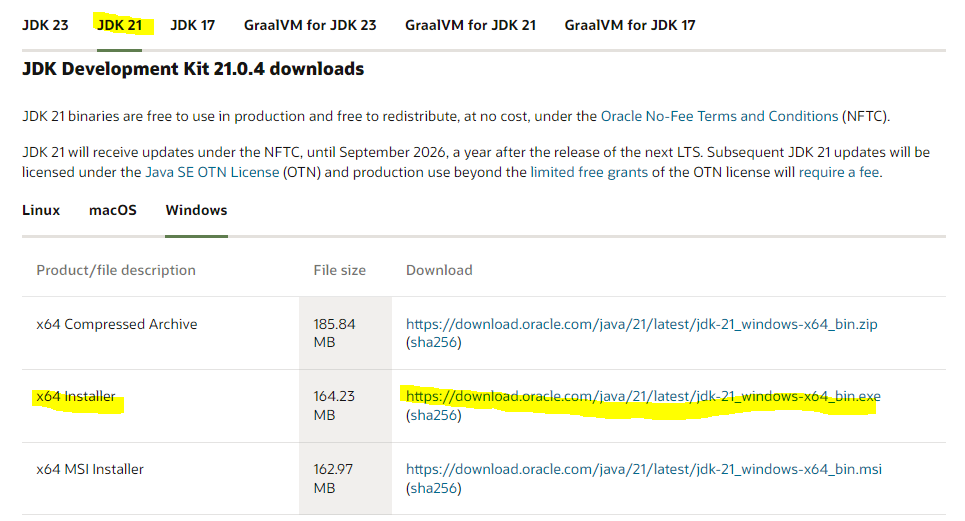
java 컴파일러 jdk를 다운로드 받는다 (저는 jdk21을 사용하였습니다.)
(3) 환경 변수 설정
1) jdk 환경 변수 설정
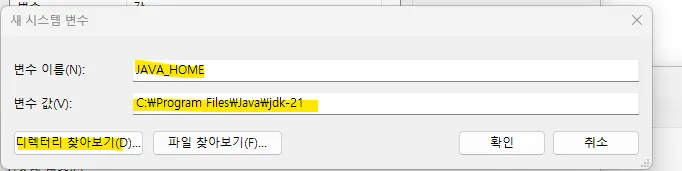
제어판>시스템 및 보안> 시스템> 고급시스템 설정> 환경변수> 시스템변수 새로만들기 > JAVA_HOME / 디렉토리
→ 자바설치된경로
위와 같은 순서로 컴파일러의 환경 변수를 설정해준다.
'BackEnd > JAVA' 카테고리의 다른 글
| [MyBatis] MyBatis 란? (2) | 2024.11.08 |
|---|---|
| 2-2 데이터 타입과 타입 변환 (4) | 2024.10.06 |
| 2-1. 변수 (6) | 2024.10.05 |