Thymeleaf practice 1
<!DOCTYPE html>
<html xmlns:th="https://www.thymeleaf.org">
<head>
<meta charset="UTF-8">
<title>Insert title here</title>
</head>
<body>
타임리프 결과 출력<br>
메세지 : <span th:text="${msg}">메세지 출력 장소</span>

<!-- jsp였다면 아래와 같은 모양이었다
<%
request.getAttribute("msg");
%>
-->
<br>
<!-- 타임리프가 안먹는 브라우저는 없다는 가정하에 만드는 형식 -->
메세지 : <span>[[${msg}]]</span>
<br>
<span th:text="'메세지 : ' + ${msg} + '입니다(값 결합 + 사용)'"></span>
<br>
<span th:text="|메세지 : ${msg}입니다(값 결합 리터럴 치환 사용)|">"|문자열|"</span>
<hr>
지역 변수 처리 :
<span th:with="kor=90, eng=80"><!-- th:with="변수명=값,..." -->
	<span th:text="|${kor} + ${eng} = ${kor+eng}|">변수는 span tag 내에서만 유효</span>
</span>
<br>
관계 연산 :
<span th:text="3 >= 4"></span> <span th:text="3 < 4"></span>
<span th:text="3 == 4"></span> <span th:text="3 != 4"></span>
<br>
조건 연산(if, unless) :
<span th:text="5 > 5?'크구나':'작네'">삼항 연산</span>
<br>
조건 연산(true) :
<span th:if="5 > 3">
조건이 참일때 수행
</span>
<br>
조건 연산(false) :
<span th:unless="5 == 3">
조건이 거짓일때 수행
</span>
<br>
switch 조건문 :
<div th:switch="${msg2}">
	<b th:case="james" th:text="|${msg2}님|"></b>
	<i th:case="tom" th:text="|${msg2}씨|"></i>
	<strong th:case="*">모르는 이름이에요</strong><!-- otherwise -->
</div>
<br>
DTO 자료 출력 : getter 사용<br>
<span th:text="${sangpum.code}">getCode 호출</span>
<span th:text="${sangpum['sang']}">getSang 호출</span>
<span>[[${sangpum.price}]]</span>
<br>
<div th:object="${sangpum}"><!-- 참조기법으로 th:object 사용 -->
	<span th:text=*{code}></span>
	<span th:text=*{sang}></span>
	<span th:text=*{price}></span>
	<span th:text=*{['price']}></span>
	<span>[[*{['price']}]]</span>
</div>
<br>
<p th:text="${list[0]}"></p><!-- 객체의 주소만 출력됨 -->
<p th:text="${list[1]}"></p>
<br>
반복 처리 : <br>
<table border="1">
	<tr>
		<th>코드</th><th>품명</th><th>가격</th>
	</tr>
	<tr th:each="s:${list}">
		<td>[[${s.code}]]</td><td>[[${s.sang}]]</td><td>[[${s.price}]]</td>
	</tr>
</table>
</body>
</html>
Thymeleaf practice 1 - 실행 결과

Thymeleaf practice 2 : 레이아웃
- 템플릿 레이아웃 : 여러 템플릿에서 같은 디자인 레이아웃을 적용하는 일반적으로 공통적인 레이아웃을 정의하고 공유하게 된다.
- 레이아웃을 사용하기 위해서 build.gradel의 dependencies 에 타임리프 레이아웃 다이얼렉트 라이브러리를 추가해주어야 한다.
implementation 'nz.net.ultraq.thymeleaf:thymeleaf-layout-dialect'
- mylayout에 header와 footer 레이아웃을 적용하는 연습을 해보았다
- 먼저 header.html 과 footer.html 을 생성했다.
<!DOCTYPE html>
<html xmlns:th="https://www.thymeleaf.org">
<head>
<meta charset="UTF-8">
<title>Insert title here</title>
</head>
<body>
<div th:fragment="header">
	머리글

</div>
</body>
</html>
<!DOCTYPE html>
<html xmlns:th="https://www.thymeleaf.org">
<head>
<meta charset="UTF-8">
<title>Insert title here</title>
</head>
<body>
<div th:fragment="badak">
	바닥글

</div>
</body>
</html>
- 그리고 mylayout.html을 생성해주었다.
<!DOCTYPE html>
<html xmlns:th="https://www.thymeleaf.org">
<head>
<meta charset="UTF-8">
<title>레이아웃 파일</title>
</head>
<body>
<!-- 헤더 조각으로 대체 -->
<th:block th:replace="~{/layouts/header :: header}"></th:block>

<!-- 특정 페이지 내용으로 대체될 동적 컨텐츠 영역, 이 부분은 각 페이지에서 치환된다 -->
<div layout:fragment="content"></div>

<!-- 푸터 조각으로 대체 -->
<th:block th:replace="~{/layouts/footer :: badak}"></th:block>
</body>
</html>
- th:replace 문법을 사용하여 레이아웃을 넣어준다. => th:replace="~{/디렉토리이름/파일이름 : : fragment설정한이름}"
- 그리고 show5.html에 이 레이아웃을 적용하여 나타내 보았다.
<!DOCTYPE html>
<html xmlns:th="https://www.thymeleaf.org" layout:decorate="~{/layouts/mylayout :: content}">
<head>
<meta charset="UTF-8">
<title>Insert title here</title>
</head>
<body>
<h2>레이아웃 연습</h2>
<div layout:fragment="content">
<h1>본문</h1><br>
</div>
</body>
</html>
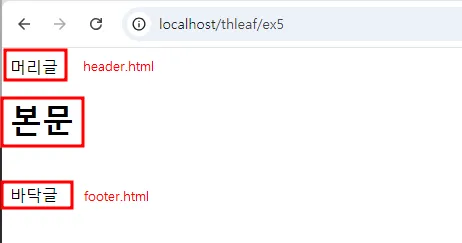
Thymeleaf practice 2 : 레이아웃 - 실행 결과
Thymeleaf practice 3 : 레이아웃 - 이미지 넣기
- static 폴더에 images 폴더를 생성해서 넣어보고싶은 이미지를 넣는다.
- show5.html에 타임리프 문법을 사용하여 이미지를 넣어준다.
<!DOCTYPE html>
<html xmlns:th="https://www.thymeleaf.org"
	layout:decorate="~{/layouts/mylayout :: content}"
>
<head>
<meta charset="UTF-8">
<title>레이아웃 파일임을 선언함</title>
</head>
<body>
<h2>레이아웃 연습</h2>
<div layout:fragment="content">
<h1>본문</h1><br>
<img alt="My Image" title="안녕" th:src="@{/images/powerpuff.png}">
</div> <!-- 여기 본문만큼만 동적으로 적용된다 -->
</body>
</html>
Thymeleaf practice 3 : 레이아웃 - 이미지 넣기 - 실행 결과